Computer-delivered IELTS in 2026: know the screen before test day
Since mid-2026, IELTS is no longer offered on paper. As a result, every test is now computer-delivered IELTS, taken at a test centre. However, the questions, the timing and the marking have not changed. What has changed is how you read, answer and check, because you do all of it on a screen.
This guide shows you the real layout, every tool on it, what changed in 2026, and how to practise on the same layout for free before test day.
Don't meet the screen for the first time on test day
In ten years of teaching IELTS, I have seen it again and again. A well-prepared student walks into the computer test, and the first minutes go on working out the screen instead of answering. It happened to me too. The clock does not stop while you look for the highlighter or try to remember how to reach Part 2.
What catches students out
Typing while you listen
There is no time at the end of Listening to copy answers onto a sheet. You type each answer as you hear it, and then you get only 2 minutes to check.
Two halves that scroll on their own
In Reading, the passage is on the left and the questions are on the right. Each side scrolls by itself, so it is easy to lose your place.
The highlighter you can't see
Highlighting and notes are there, but there is no button for them, so you select the words and right-click.
Getting to the next part
The question numbers along the bottom of the screen are how you move between questions and parts. If you don't know that, Part 2 can feel lost.
Typing slower than you think
Typing 250 words under time pressure is slower than most students expect, so watch the word count: it shows how far you are.
Spelling without help
There is a word counter, but no help with spelling. Every spelling mistake is yours, so check your own spelling.
None of this is hard. It is only new, but new costs time. So meet the screen before test day, when a mistake costs nothing.
What changed in IELTS in 2026
IELTS announced the change on 5 March 2026. Here is what it means for you, in plain words.
No more paper tests
From mid-2026, IELTS no longer offers a paper-based test, and all tests are delivered on computer. The date was different in each country, but the British Council already says IELTS on paper is no longer available.
Writing on Paper
In selected countries, you can now handwrite only the Writing section. Listening and Reading are still on the computer. The Writing tasks appear on the screen, but you write your answers on an answer sheet. Also, your results do not show which option you chose.
The same test and the same scores
IELTS says the change does not alter the skills tested or the way results are read, and its research also found that scores are comparable across formats.
Results in days, not weeks
Computer results are typically ready within 1 to 5 days.
IELTS for UKVI is digital only
The IELTS test for UK Visas and Immigration is available only in the fully digital format.
One Skill Retake
If your centre offers it, you can retake one skill within 60 days of your test, once. A Writing on Paper retake must also be on paper.
Paper results still count
Results from paper tests are not affected, so they stay valid for the usual two years.
The computer-delivered IELTS screen, part by part
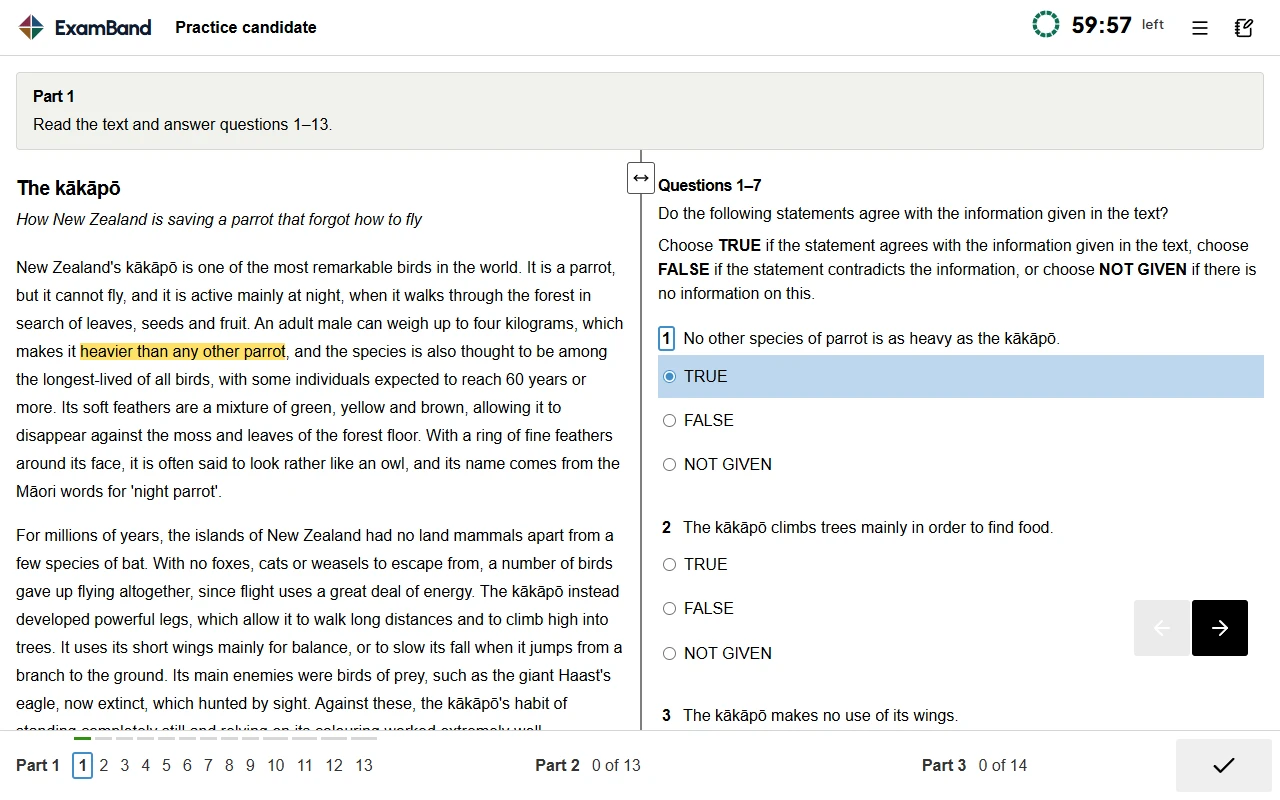
This is a Reading screen. The real test and ExamBand use the same layout, so everything below works the same way on both.
Time left
The clock at the top shows how much time is left. On the real test, it flashes in the last 10 and the last 5 minutes.
The part box
Each part starts with a grey box that tells you which questions to answer.
Passage on the left
The text you read, which also scrolls by itself.
Questions on the right
The questions, which also scroll by themselves. Answer them here.
Highlight and notes
Select words and right-click to highlight them or add a note.
Question numbers
Click a number to jump to that question. Answered questions are marked, so you can see what is left at a glance.
Previous and next
The arrows move one question at a time.
Settings
Change the text size and the colours, for example white text on black.
Listening: type as you hear
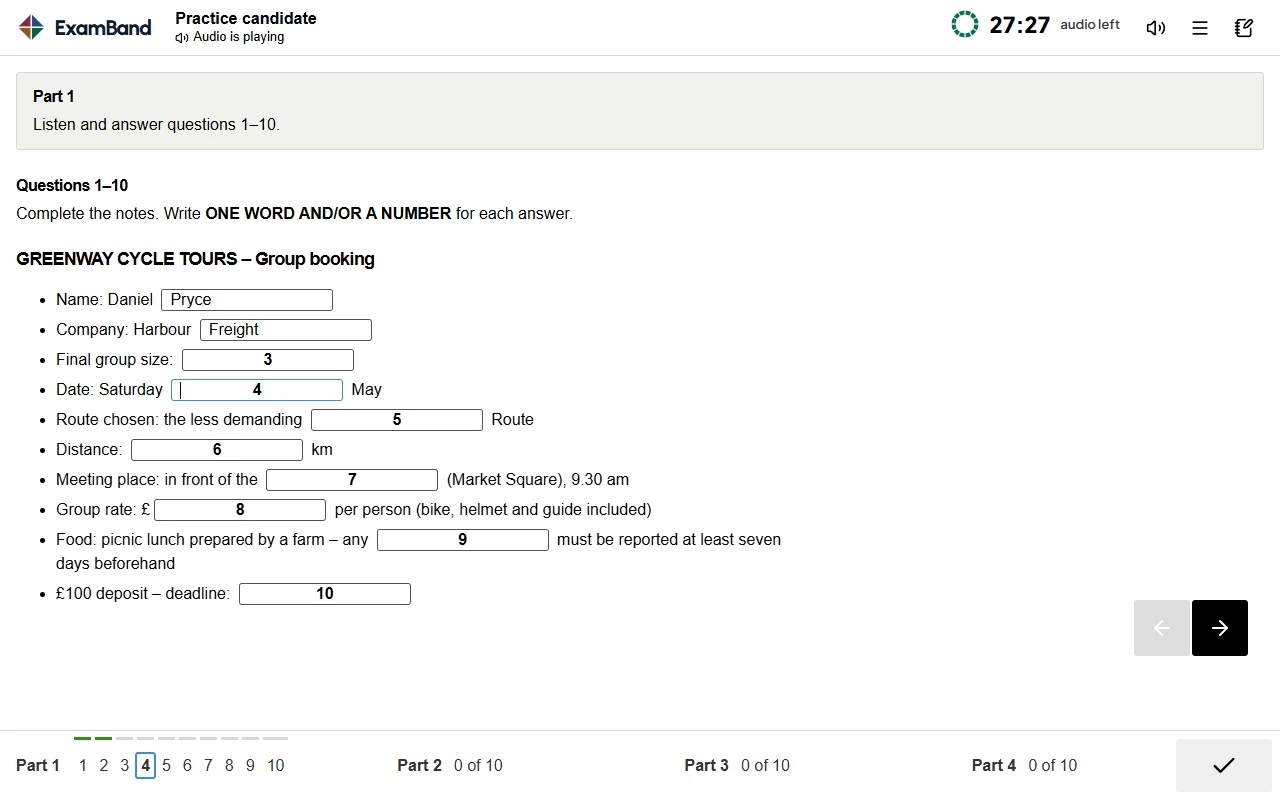
- You wear headphones, and there is a volume control on the screen.
- You type each answer into its box while the recording plays.
- There is no time to transfer answers, so the 2 minutes to check at the end are all you get.
- You still get paper and a pencil for your own notes.
Writing: the task on the left, your answer on the right
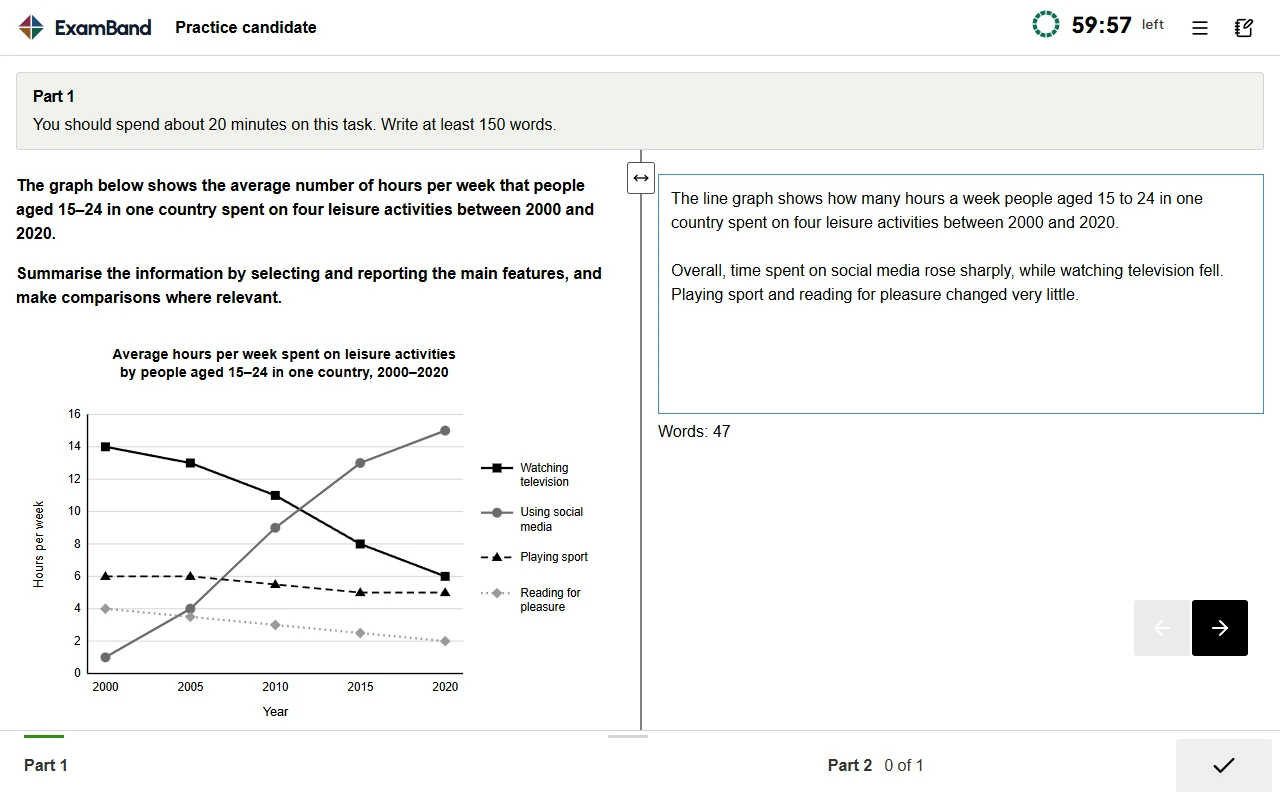
- The task stays on the screen while you type your answer beside it.
- Also, a word count on the screen updates as you type.
- You can start with either task, and your answers are saved as you go.
- There is no spell checker, so check your own spelling.
However, Speaking does not change: it is a face-to-face conversation with an examiner, 11 to 14 minutes long, on the same day or within 7 days of the other parts.
The real test and ExamBand, side by side
ExamBand's tests are built on the same layout as the real computer test, so the screen feels familiar on the day.
| On the screen | Real test | ExamBand |
|---|---|---|
| Passage on the left, questions on the right | Yes, with a divider you can drag | |
| Select words and right-click to highlight or add a note | Yes: Highlight, Notes, Clear | |
| Question numbers along the bottom | Yes, with a green line under answered questions | |
| 2 minutes to check at the end of Listening | Yes | |
| A word count while you write | Yes | |
| Text size and colour settings | Yes: three colour modes and text sizes | |
| A clock that shows the time left | Yes, to the second |
How to practise for computer-delivered IELTS
Practise on a computer
ExamBand also works on a phone, but sit at a computer at least a few times before test day, because the real test is on a computer.
Type Listening answers as you listen
Never write them down to copy later. On the real test there is no time for that.
Highlight in every Reading passage
Mark names, dates and numbers as you read, so you can find them again quickly.
Type your essays and watch the word count
Spend about 20 minutes on Task 1 and 40 minutes on Task 2, and see how many words you really type in that time.
Check your own spelling
Turn off autocorrect when you practise, because the test has none.
Sit a full test in one go
Listening, Reading and Writing run in one sitting, with no breaks: about 30, 60 and 60 minutes. Build up to that before the real day.
Should you choose Writing on Paper?
If your test centre offers it, Writing on Paper may suit you if you type slowly or find typing difficult. Everything else stays the same: the tasks, the 60 minutes and the marking.
Two things to remember. First, the examiner must be able to read your handwriting, so write clearly; if you make a mistake, cross it out clearly and keep going. Second, if you later book a One Skill Retake for Writing, it must be on paper too.
Computer-delivered IELTS: questions students ask
Is IELTS still available on paper in 2026?
No. From mid-2026, all IELTS tests are delivered on computer. In selected countries you can choose Writing on Paper, which means you handwrite only the Writing section.
Is computer-delivered IELTS harder than the paper test?
No. The questions, the timing and the marking are the same, and IELTS says scores are comparable across formats. What is different is the screen, so practise on it before test day.
How long do computer-delivered IELTS results take?
Results are typically ready within 1 to 5 days.
Is the Speaking test on a computer?
No. Speaking is still a face-to-face conversation with an examiner, 11 to 14 minutes long.
Can I practise computer-delivered IELTS for free?
Yes. The British Council and IDP publish free samples on the real test screen, and ExamBand's Practice Test 1 is free in all four skills, on the same layout.
Can I write by hand in the computer test?
Only if your centre offers Writing on Paper. Then Listening and Reading are on the computer, and you handwrite your Writing answers on an answer sheet.
Read next: IELTS Writing Task 1: how to describe a graph
Facts checked on 19 October 2026 with official sources